

A couple of weeks ago, I picked up a pair of Even Realities G2 smart glasses. They feel like future-tech without the usual hardware-startup delusion that every device needs to replace your phone: real-time translation, a HUD teleprompter, quick voice queries, and just enough display to make information feel ambient instead of invasive.
But my interest was narrower. I didn’t buy them to talk to AI in public or read dense logs on my lenses. I was chasing a more specific question: could they become a peripheral display for background agent work?
I built a small, self-hosted system called Beacon around one annoying problem: long agent runs should not require me to sit there and babysit the terminal.
Last week, during a workout, Beacon crossed from a fun hack into an actual interface.
Before leaving my desk that afternoon, I kicked off a performance analysis for the puzzle packer for Right Words. A possible v2 feature for community puzzle submissions had dragged packer runtime out of my terminal and into the user experience.
Previously, I didn’t mind if the packer took a few minutes. I’d kick it off and let it run. But in a real-time user-facing flow, waiting minutes for a puzzle to pack was a non-starter.
I asked Claude Code to profile the packer’s phrase-placement loop, with a focus on candidate path generation and dead-space detection. I needed to see which grid constraints caused the heuristics to stall and where the packer was actually spending its time.
Agents are good at that kind of slog: trace the loop, run the profile, compare the stalls, summarize the bottlenecks. The old cost was attention. I still had to sit there, wait for output, and monitor the terminal logs.
Instead, I went to the gym.
Ten minutes into my workout, a line of green text silently flickered into my peripheral vision:
BEACON - rightwords.io▲ packer-opt: packer profiling complete. 3 core bottlenecks diagnosed.
The message gave me just enough signal to know the terminal had produced something worth reading.
I finished my set, pulled out my phone and remoted into my home session (thx, Tailscale). The glasses stayed out of the interaction. They pointed me back to the place where the next judgment call lived. Because a deep performance profile is not a binary execution block, I needed to read Claude’s analysis, evaluate its diagnostics and decide whether I agreed with its proposed optimizations.
That gym run reframed the problem around attention routing.
For agentic tools, the useful interface is a thin peripheral signal that appears only when the machine has reached the edge of its autonomy and needs a human to choose the next move.
Beacon: A Router, Not a Dashboard
Beacon is the small, self-hosted pipeline I built to test this idea: a local hook, a compression layer, and a push surface that stays quiet until an agent needs my attention.
1. The Hook Layer (Bash): Claude Code’s Stop/Notification hooks trigger a local script, beacon-watch.sh. The script waits 10 seconds, then checks if my terminal window and tmux pane are focused. If I’m already editing or observing the terminal, it stays silent. Otherwise, it pings the relay layer.
2. The Relay Layer (Vercel Edge Function): An edge function receives the payload and passes the last assistant message through Claude Haiku, which summarizes it into a ~50-character, dense HUD message.
3. The Push Layer (Expo Go): For this v1 proof-of-concept, the formatted string is pushed through Expo and Apple’s notification service to my iPhone, where the Even Realities app mirrors it directly to my glasses.1
Beacon is my prototype of an ambient decision surface. It is a sparse peripheral display for routing the state and diagnostic of a background process to your attention.
Status Belongs on the Wall
My first mistake was routing everything to my glasses, including puzzle_solved events from Right Words. It was fun for about five minutes, then obviously useless. Every solve was a micro-distraction.
Puzzle solves are pure status notifications: passive, communal updates that do not require my judgment. That class of data belongs on a wall, maybe even a physical one, like a mechanical Vestaboard clacking quietly in the background of a room as an information radiator.
Beacon only matters at the point where status turns into a decision.
The Side Project Is Multi-Threaded Now
AI changed the topology of my side projects. Historically, developers have worked linearly, picking one repo, focusing on a single branch, and pushing it to completion because the cognitive cost of context-switching is too heavy.
Now, I keep three to five side projects moving in parallel. I might have Claude Code handling a major refactor in one terminal tab, building out a test suite in another, and profiling the puzzle packer in a third.
Working like this used to melt my brain. Background agents let you pipeline execution, but then you need to know when one of those threads has stalled. Before Beacon, I was tabbing through terminal windows like a paranoid security guard flipping between CCTV feeds, making the rounds just to see if anything needed me.
Beacon gives me controlled re-entry. I can leave chained-to-the-desk developer mode entirely. I can go to the gym, cook dinner, or read a book, knowing that if one of those concurrent threads needs me, my glasses will tell me where to look.
Parallel Agents, Serial Judgment
In my last two posts, I wrote about comprehension debt and how AI makes execution cheap but leaves judgment expensive.
If an agent can execute ten hours of work in ten minutes, it will inevitably reach ten moments where it needs to ask you: “Is this actually what you wanted?”
If the agent has to wait for you to sit down at your desk, load the context, and read a PR to answer those questions, the speed advantage evaporates. But if the agent pages you for every minor lint error, file write, or test run, you will throw your laptop out the window.
We are currently trying to solve this with two familiar primitives: notifications and dashboards. Neither quite matches the failure mode of agentic work.
Beyond the Push Notification
The obvious objection here is: “Isn’t this just a phone notification in 2049 cosplay? My CI pipeline already pings Slack when it fails.”
Most notifications report a closed event: X happened. Agent blocks are different. They arrive mid-thread: I ran X, hit Y, and need Z to proceed.
When a standard CI pipeline fails, it stops. The system has no next move. It pages you because the system is mechanical: it can report failure, but it cannot reason through the next move. The only path forward is a human restart. But when an AI agent blocks, it is not dead; it is polling for intent. It has completed 90% of the execution, mapped the immediate tradeoffs, and is waiting for your input to decide the final 10%. It is a living, stateful thread.
If you route that block as a raw log or a generic Slack ping, you have degraded a stateful, high-leverage agent into a dumb cron job. A generic notification says “look at this” and throws you into the pile. A decision surface preserves the useful bit: where judgment is needed.
More importantly, notifications flatten everything into peers. Your phone treats texts, calendar reminders, and an agent’s build failure as the exact same kind of interruption.
An ambient decision surface can take many forms: a HUD in your glasses, a tiny e-ink display on your desk, or a single-line widget on your desktop. The hardware matters less than the rule: keep it sparse, peripheral, and reserved for moments that need judgment.
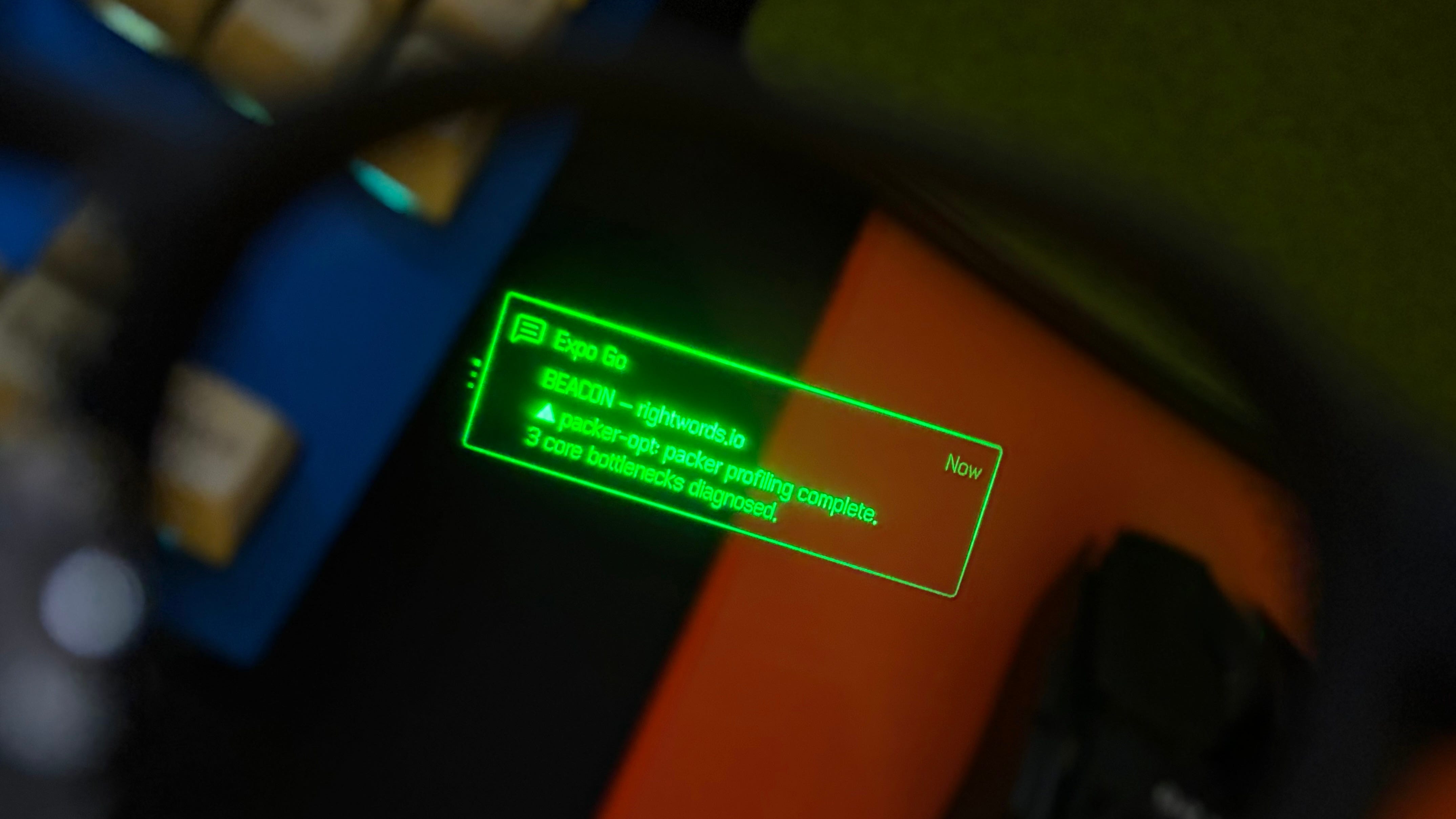
To be clear, Beacon does not replace the terminal. When I remoted in from the gym, I was still using the same command-line tmux session. But there is a fundamental cognitive difference in how I reached that session. I did not get there by polling a dashboard, and I did not get there by letting an ordinary phone notification pull me into the pile. I got there because a compressed ambient signal told me exactly where my judgment was needed.
I am, admittedly, a sucker for hardware that makes the future feel less theoretical. I want the useful side of cyberpunk: high-agency tools that make one person more capable without turning every surface into an ad slot or another demand for attention. That is what worked about the G2s. They did not try to become my phone. They left me in the real world, adding only a small green status line at the edge of my vision when something was worth my attention.
The Dashboard Fallacy
The other default response is to build an “agent dashboard.”
Dashboards are fantastic when you want to inspect a system. They are terrible when the system’s primary job is to reduce the need for inspection.
A dashboard forces you to play the role of the anomaly detector. You have to poll the interface, scan the green checkmarks, read the log lines, and try to deduce where the agent is stuck or where its design is drifting from your intent.
To put it bluntly: a dashboard is what you build when you don’t yet know what actually deserves a human eye. It means the compression layer has not done its job.
Why Your Phone is the Wrong Surface
But still, the engineer asks: “Why not just route these compressed decision boundaries to my phone Lock Screen? It’s already in my pocket.”
Because the phone is a destination rather than an environment.
To interact with a phone, you must cross a threshold of conscious intent. You pick it up, aim your face at its sensors, unlock it, and step inside. The phone is physically designed to consume 100% of your central attention.
Your phone is a focus casino. The moment you unlock it to resolve a build block, you’re pulling the slot machine’s lever. You are standing in the middle of a carnival of other apps specifically engineered to hijack your focus. Suddenly, a three-second review task has morphed into thirty minutes of brain-melting doomscrolling. The context-switch has already occurred.
A true ambient surface, like smart glasses or a physical status indicator on your desk, lives in your periphery. It has zero nesting depth. There are no folders to open, no other apps to swipe through, and no keyboard to summon. It sits in the room with you: something you can glance at, resolve with a single tap, and dismiss without ever leaving your current physical or mental state.
You do not “go to” an ambient surface. It occupies the background of your life until a decision requires it to step forward.
Calm Technology for Agentic Work
This isn’t a new design challenge, though AI has made it urgent. In the mid-1990s, Xerox PARC researchers Mark Weiser and John Seely Brown introduced the concept of Calm Technology. They argued that the most powerful machines would be those that “fit our lives” by moving seamlessly between our peripheral attention and our central focus.
An ambient decision surface is calm technology applied to the cognitive load of AI.
To work, a decision surface has to enforce a strict rule of context compression. If an agent is blocked, it cannot simply dump a stack trace onto your screen. It has to translate the block into product terms:
1. The Context: What is the active state and diagnostic?
2. The Decision Boundary: Why can’t the agent proceed autonomously?
3. The Resolution Path: What is required of human judgment to unblock it?
In practice, that means Beacon should not tell me that a process emitted 400 lines of logs. It should tell me the one thing I need to know:
▲ packer profiling complete. 3 core bottlenecks diagnosed.
The decision surface does not ask you to fix the problem on your wrist or your lens. It gives you enough shape to know what is waiting. When you return to the terminal, you are not spending ten minutes rediscovering the issue. You already know the diagnostic before your hands touch the home row.
Smart Glasses as a Forcing Function
This is where the constraints of smart glasses start doing useful design work.
One reason so many consumer hardware startups struggle is that they try to fit “phone-sized” experiences into wearable form factors. They want you to talk to a pin, or look at a wrist-mounted screen, to do things your phone does ten times better.
Smart glasses punish bad information design. They have almost no room for input, scanning, or explanation, which makes them useful as a forcing function for information density.
Because the G2s have such limited screen real estate and zero keyboard input, they force the developer of the agent interface to write better communication algorithms. If the interface has to explain an architectural block in 15 words, it suddenly becomes very good at summarizing tradeoffs.
The constraint of the glass lens forces the software to respect your skull.
Don’t Answer Back
Even Realities has a built-in “talk to AI” voice feature. A tool like Beacon invites an obvious next question: “Why not let me voice-chat my response back to Claude from my glasses?”
That is where the interface stops being calm.
The moment you dictate refactors to your glasses, you have let the machine take over your environment. You are no longer in your periphery; you are actively context-switching. The glasses are no longer calm.
The useful pattern is the handoff. An ambient surface should do exactly one thing: signal when your input is required. If it’s a binary decision, I might eventually allow a simple physical tap gesture on the frame to choose a default. But if it’s a real architectural decision, it should simply route your attention back to your actual action-oriented operating surfaces, meaning your terminal, your editor, and your computer. The glasses act as the compass, leaving the terminal to serve as the steering wheel.
The Cost of Free Execution
We don’t all need to walk around in smart glasses to make this work. The hardware just makes the interface problem visible: stay out of the way until there is something to judge.
Five agents create five streams of partially resolved work, and every unresolved thread eventually lands back on the same copy desk.
AI made execution cheap, but judgment still bottlenecks on one editor, one context window, one red pen. Build the interface around that constraint.
Because this still runs through the default Expo client, the HUD notification header says “Expo Go.” Since I am pathologically particular about labels, I will eventually give Apple the $99 so an EAS Preview Build can say “Beacon” instead. 🫠